Chat games
Logic Test chat game: IQ-style puzzles, A to D
A psychotechnic-style puzzle on your overlay: a grid, a shape sequence, an odd one out or a number series. Chat answers A to D and everyone right wins.
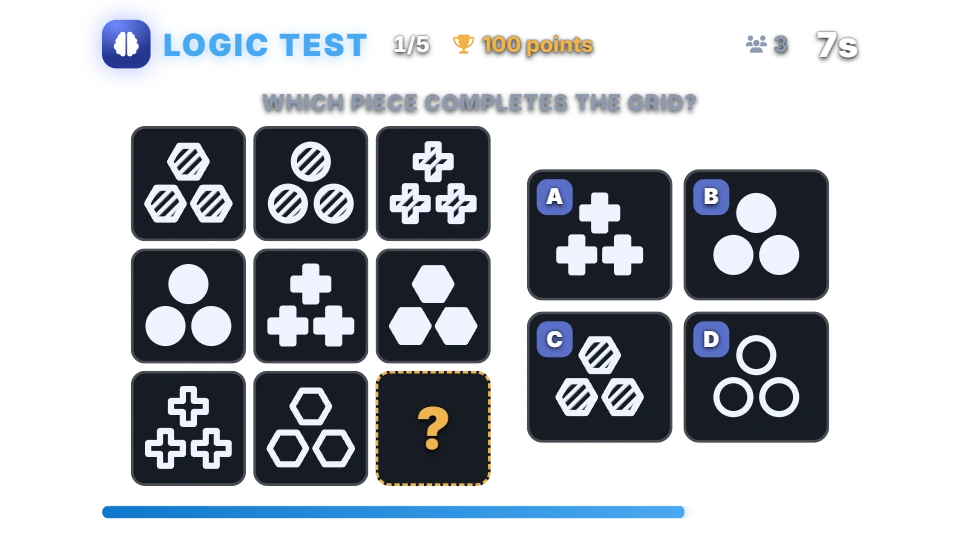
How a puzzle works
A moderator types !logic or !iq, or a timer starts it. The overlay shows a puzzle with four answers, A to D. Each viewer’s first answer counts. When the 30 seconds are up, the overlay marks the right answer and shows how many viewers got it, and everyone who picked it wins the reward.
A game is five puzzles in a row by default, with a short pause between them, and the bot posts the top three viewers at the end. Every puzzle is one of four types:
- Grid: a 3×3 grid of shapes with the last cell missing.
- Shape sequence: a row of shapes that follows a rule, with the next one missing.
- Odd one out: four shapes, three that share a rule and one that doesn’t.
- Number series: five or six numbers that follow a rule, with the next one missing.
Chat commands
| Command | Who | What it does |
|---|---|---|
| !logic or !iq | Moderators | Starts a game of puzzles. |
| !logic stop | Moderators | Reveals the answer to the puzzle on screen and ends the game with its scoreboard. |
| A, B, C or D | Anyone | Answers. Only the first answer of each viewer counts. |
Puzzles and rewards
There are no bets. Every right answer earns the reward from your points system, 100 points by default, for each puzzle, so a game of five puzzles can pay a viewer up to five rewards.
Puzzles are generated on the spot, not taken from a fixed list, so there is nothing to memorise, and the bot avoids asking one it asked lately. Each puzzle is built so that only one of the four options fits its rule, and the bot checks this before it shows the puzzle.
An answer is a message that is just the letter, in capitals or not, with or without a bracket or a full stop. On a Hebrew keyboard א, ב, ג and ד work as A to D. Any other message is ordinary chat.
Settings you can change
| Setting | Default | What it changes |
|---|---|---|
| Reward for each right answer | 100 | Points for every viewer who is right, for each puzzle. |
| Puzzle types | All four | Each puzzle is one of the types you tick, picked at random. |
| Difficulty | Medium | Easy changes one thing at a time, medium two, hard three. Number series and odd-one-out puzzles get trickier rules as well. |
| Puzzles per game | 5 | From 1 to 30, asked one after another. |
| Time to answer | 30 seconds | Per puzzle, from 10 to 300 seconds. |
| Pause between puzzles | 8 seconds | Time to see the answer before the next puzzle. |
| Start automatically every | Off | Starts a game on its own every few minutes while you are live. |
Set up Logic Test
- Turn on the points system on the Points page, or switch on “Play without points” on the Mini-games page if you want rounds without stakes.
- Open Mini-games in the dashboard sidebar and switch Logic Test on.
- Press Configure to change the rules, timing, look and every chat message the bot sends for this game.
- Use the Test button next to the overlay preview to play a practice round on your overlay. Test rounds never move points and never post in chat.
Show it on stream
Logic Test is already part of your all-in-one overlay, so if that browser source is in your scene there is nothing else to add. The game stays invisible until a round starts and fades out when it ends.
If you want to place the game on its own, copy the overlay URL from the game’s settings page and add it in OBS as a Browser source at the size shown next to the URL. Keep that URL private: it belongs to your channel.
The overlay shows the puzzle, a countdown and how many viewers have answered so far. The right answer stays on the server until the time is up.
Questions
Is Logic Test on the free plan?
Needs InstiBot Premium. On the free plan the game is shown with a lock and its command stays silent.
How is it different from Quiz?
Quiz asks word questions that are built in or written by you. Logic Test makes picture and number puzzles on its own, so there is nothing to write and nothing for viewers to look up.
Can I write my own puzzles?
No. The bot generates every puzzle; you choose the types and the difficulty.
In which language is the overlay?
The labels on the overlay card are in English. Every message the bot sends in chat can be edited in the game’s settings.