Chat games
Weapon case opening chat game
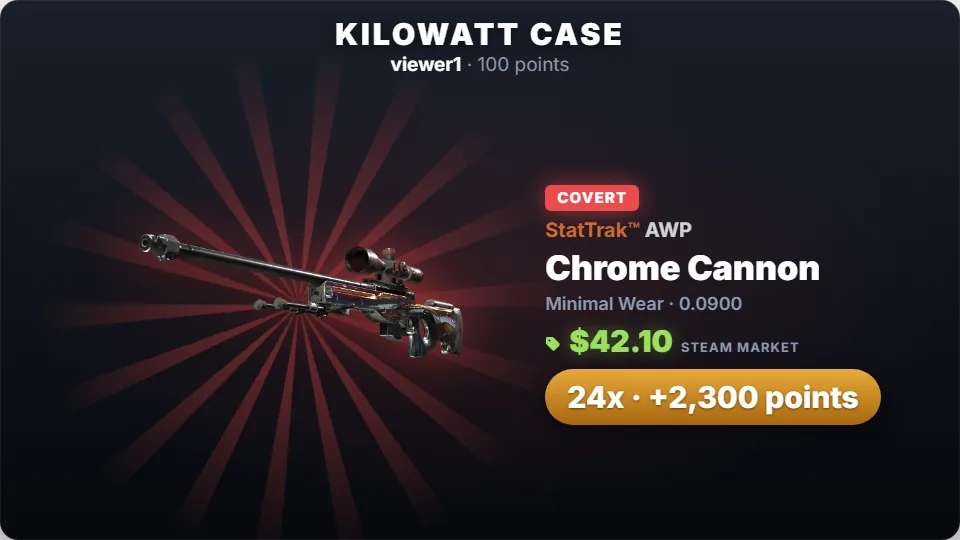
Viewers open a random weapon case on your overlay: the case unlocks, the reel stops on a real skin with wear and StatTrak, and its Steam Market price pays the bet.
Weapon Cases
Case opening is instant. A viewer types the command with a bet, a random case appears and is unlocked, and the reel spins until it stops on an item. The rarity follows the published case odds, the float is drawn from the skin’s real range (it sets the wear), and one in ten items that have a StatTrak version comes out StatTrak. The item’s Steam Market price is shown and decides the payout.
Chat commands
| Command | Who | What it does |
|---|---|---|
| !case 100 | Anyone | Opens a case with 100 points. |
| !cases 100 / !opencase 100 | Anyone | Short aliases. |
What it pays
Each item pays by its current Steam Community Market price: the dearer the skin, the more it pays, and knives and gloves pay the most. Payouts are scaled so every case returns about 94% of bets on average, and a StatTrak item counts at its own price. Prices are read once a day; until they are in, the rarities pay 0.35x, 1.4x, 5x, 20x and 50x. Points are your channel’s own virtual currency with no cash value.
| Rarity | Chance |
|---|---|
| Mil-Spec | 79.92% |
| Restricted | 15.98% |
| Classified | 3.2% |
| Covert | 0.64% |
| Rare Special (★) | 0.26% |
Settings you can change
| Setting | Default | What it changes |
|---|---|---|
| Reel spin | 6 seconds | How long the reel spins before it stops. |
| Minimum and maximum bet | 10 / no limit | The bet range. |
| Per-viewer cooldown | 15 seconds | Time before the same viewer can open again. |
Set up Weapon Cases
- Turn on the points system on the Points page, or switch on “Play without points” on the Mini-games page if you want rounds without stakes.
- Open Mini-games in the dashboard sidebar and switch Weapon Cases on.
- Press Configure to change the rules, timing, look and every chat message the bot sends for this game.
- Use the Test button next to the overlay preview to play a practice round on your overlay. Test rounds never move points and never post in chat.
Show it on stream
Weapon Cases is already part of your all-in-one overlay, so if that browser source is in your scene there is nothing else to add. The game stays invisible until a round starts and fades out when it ends.
If you want to place the game on its own, copy the overlay URL from the game’s settings page and add it in OBS as a Browser source at the size shown next to the URL. Keep that URL private: it belongs to your channel.
The overlay only shows the result; the outcome is decided on the server with a cryptographic random number before the animation starts. If no overlay is open, the result is posted in chat straight away.
Questions
Is this game on the free plan?
Needs InstiBot Premium. On the free plan the game is shown with a lock and its command stays silent.
Where do the images come from?
The case and skin images are the in-game renders served by Steam, shown inside our own tiles. Prices come from the Steam Community Market.