Chat games
Gamble chat game: roll 1 to 100 for points
The simplest points game for stream chat: viewers roll a number from 1 to 100, high rolls double the bet and the top rolls hit the jackpot on your overlay.
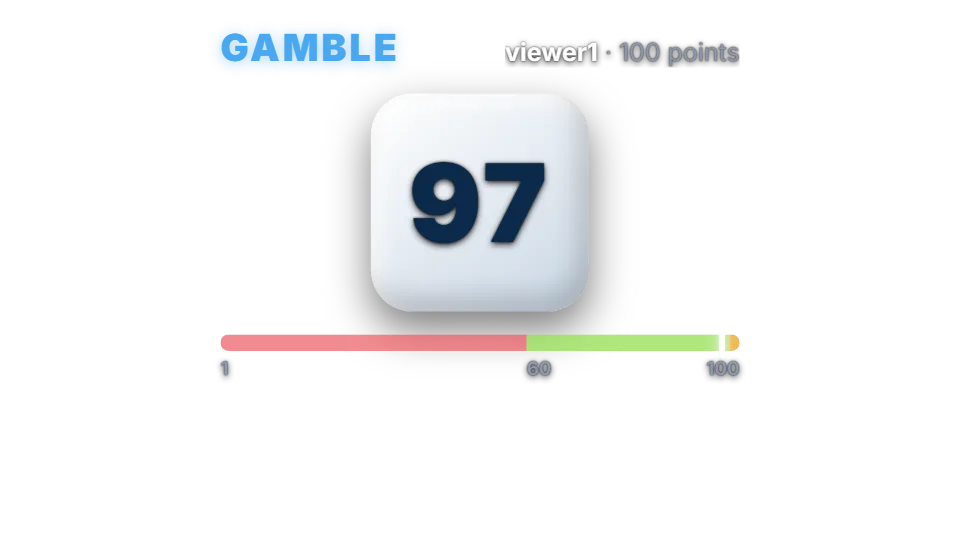
How a roll works
Gamble is instant. A viewer types !gamble with a bet and rolls a number from 1 to 100. With the default settings a roll of 60 to 98 doubles the bet, a roll of 99 or 100 pays 3x as a jackpot, and anything below 60 loses the stake.
The overlay shows a large number flickering before it lands, on a 1 to 100 bar with the losing, winning and jackpot zones marked, so everyone can see how close the roll was.
Chat commands
| Command | Who | What it does |
|---|---|---|
| !gamble 100 | Anyone | Rolls with a 100 point bet. |
| !gamble 50% | Anyone | Bets half of the viewer’s points. |
Payouts and odds
With the defaults 39 of the 100 rolls double the bet, 2 pay the jackpot and 59 lose, so gamble returns 84% of all bets on average. It is the quickest way for points to leave circulation. Move the thresholds or payouts to make it kinder; the dashboard shows the new return straight away.
Points are your channel’s own virtual currency. They have no cash value and cannot be bought or paid out.
Settings you can change
| Setting | Default | What it changes |
|---|---|---|
| Win from roll | 60 | The lowest roll that wins. |
| Win payout | 2 | Multiplier for a normal win. |
| Jackpot from roll | 99 | The lowest roll that hits the jackpot. Never below the win roll. |
| Jackpot payout | 3 | Multiplier for a jackpot. |
| Per-viewer cooldown | 20 seconds | Time before the same viewer can roll again. |
Set up Gamble
- Turn on the points system on the Points page, or switch on “Play without points” on the Mini-games page if you want rounds without stakes.
- Open Mini-games in the dashboard sidebar and switch Gamble on.
- Press Configure to change the rules, timing, look and every chat message the bot sends for this game.
- Use the Test button next to the overlay preview to play a practice round on your overlay. Test rounds never move points and never post in chat.
Show it on stream
Gamble is already part of your all-in-one overlay, so if that browser source is in your scene there is nothing else to add. The game stays invisible until a round starts and fades out when it ends.
If you want to place the game on its own, copy the overlay URL from the game’s settings page and add it in OBS as a Browser source at the size shown next to the URL. Keep that URL private: it belongs to your channel.
The overlay only shows the result; the outcome is decided on the server with a cryptographic random number before the animation starts. If no overlay is open, the result is posted in chat straight away.
Questions
Is gamble free?
Included on the free plan.
Is the roll fair?
Every number from 1 to 100 is equally likely. The roll is made on the server before the overlay animates it.