Chat games
Higher or Lower card game for stream chat
Viewers draw a card and guess whether the next one is higher or lower. Every right guess grows the pot, so the question is when to cash out.
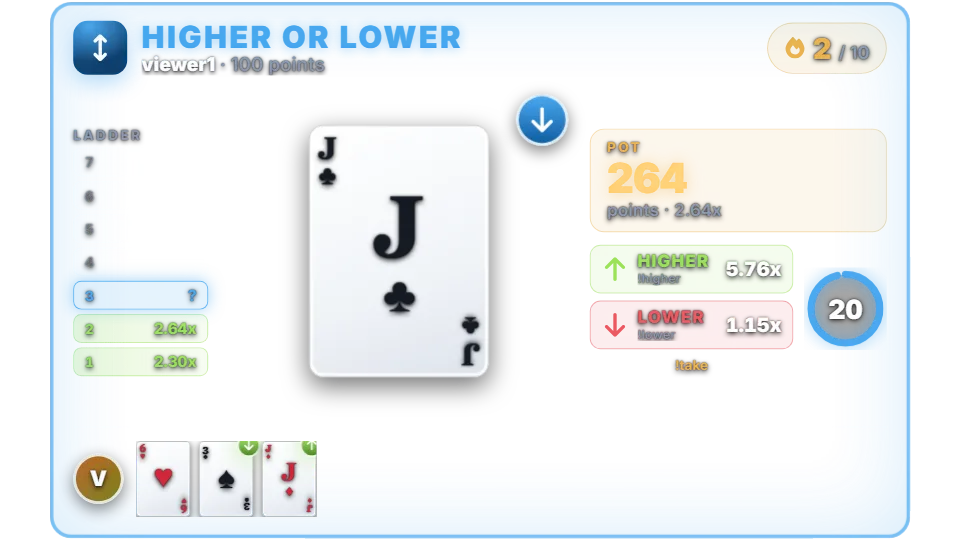
How a round works
Cards run from Ace (low) to King. After the first card, players guess whether the next card will be higher or lower. A right guess multiplies the pot, a wrong guess loses the whole stake, and players can take their winnings at any time.
By default it is a shared round for up to 20 players: a round opens, viewers join within 15 seconds, and everyone guesses the same cards with 12 seconds per card. Players who don’t guess in time are cashed out at their current multiplier.
Set “Max players per round” to 1 for private games instead: each viewer gets their own card and plays at their own pace, with 20 seconds per guess.
Ten right guesses in a row cash out automatically. By default only moderators can open a new round (“Who can start a round” is set to Moderator). Viewers join a round that is already open. Change the setting to Anyone if viewers should be able to start rounds themselves, or let rounds open on a timer.
Chat commands
| Command | Who | What it does |
|---|---|---|
| !highlow 100 | Anyone (to join) | Joins the open round, or starts a private game, with 100 points. |
| !higher / !lower | Players | Guesses the next card. !h and !l are short forms. |
| !take | Players | Cashes out the current pot. |
| !hl higher | Players | The alias with the guess in one message. |
Multipliers and odds
Each guess pays according to its chance: guessing “lower” on a King pays little, guessing “lower” on a 3 pays a lot. The overlay shows the multiplier for each guess before you choose. When the next card has the same rank, the default is a push: the pot stays and the game goes on.
With the default 4% house edge a single guess returns about 96% on average. Points are your channel’s own virtual currency. They have no cash value and cannot be bought or paid out.
Settings you can change
| Setting | Default | What it changes |
|---|---|---|
| House edge | 4% | From 0 to 30%. |
| When the next card has the same rank | Push (no change) | Push or Loss. |
| Max correct guesses | 10 | Automatic cash-out after this streak. |
| Max players per round | 20 | 1 makes every game private. |
| Time to join a round | 15 seconds | The join window. |
| Time to guess | 12 seconds (round), 20 (private) | Per card. |
Set up Higher or Lower
- Turn on the points system on the Points page, or switch on “Play without points” on the Mini-games page if you want rounds without stakes.
- Open Mini-games in the dashboard sidebar and switch Higher or Lower on.
- Press Configure to change the rules, timing, look and every chat message the bot sends for this game.
- Use the Test button next to the overlay preview to play a practice round on your overlay. Test rounds never move points and never post in chat.
Show it on stream
Higher or Lower is already part of your all-in-one overlay, so if that browser source is in your scene there is nothing else to add. The game stays invisible until a round starts and fades out when it ends.
If you want to place the game on its own, copy the overlay URL from the game’s settings page and add it in OBS as a Browser source at the size shown next to the URL. Keep that URL private: it belongs to your channel.
The overlay only shows the result; the outcome is decided on the server with a cryptographic random number before the animation starts. If no overlay is open, the result is posted in chat straight away.
Questions
Is Higher or Lower on the free plan?
Needs InstiBot Premium. On the free plan the game is shown with a lock and its command stays silent.
Does !h clash with other commands?
The short !h and !l only answer viewers who are playing Higher or Lower or sitting at a blackjack table, so they stay quiet for everyone else.