Chat games
Roulette chat game for Kick, Twitch and YouTube
Run a European roulette table in your stream chat: viewers bet loyalty points on red, black, odd, even or a number, and the wheel spins on your OBS overlay.
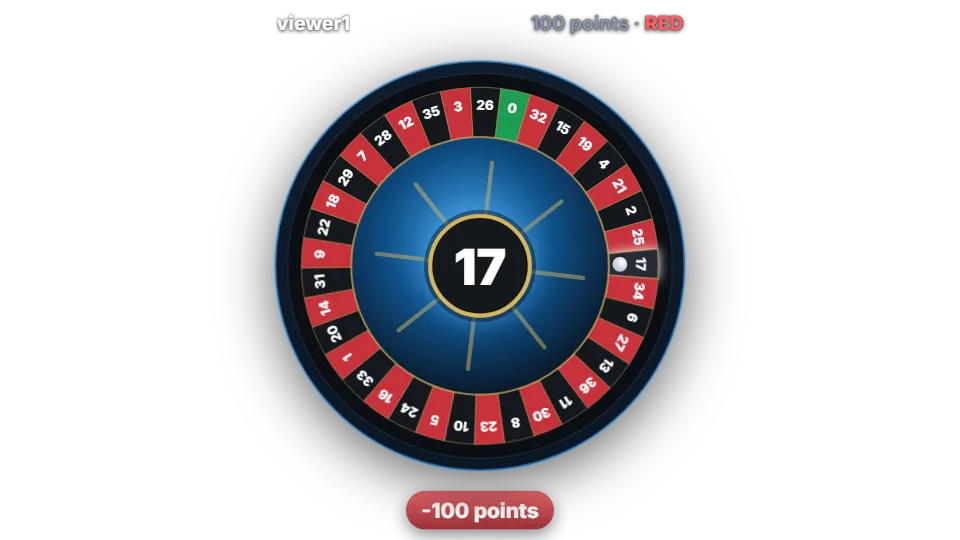
How a round works
Roulette uses a European wheel with 37 pockets, 0 to 36. By default it runs as a betting table: the first bet opens the table, a 20 second betting window starts, and everyone in chat can place bets until it closes. One spin then settles every bet on the table at once.
Each viewer can place up to three bets per round, each on a different choice, so “red 100” and “17 20” in the same round are fine. If nobody bets, the table closes on its own.
Set the betting time to 0 and roulette becomes instant instead: every command is a private spin for that viewer alone, with no shared table.
Chat commands
The choice and the amount can be written in either order. Amounts accept a number, all, max, a percentage such as 50% or short forms like 2k.
| Command | Who | What it does |
|---|---|---|
| !roulette red 100 | Anyone | Bets 100 points on red. Also works with black, green, odd, even or a number from 0 to 36. |
| !rl 100 17 | Anyone | The short alias. Bets 100 points on number 17. |
| !roulette … (first bet) | Moderator by default | Opens the betting table when no round is running. |
Payouts and odds
Payouts are multipliers of the bet and include the stake. With the default settings red, black, odd and even pay 2x, and green (0) or a single number pays 36x. Zero loses every red, black, odd and even bet.
With these defaults roulette returns 97.3% of all bets on average, the classic European house edge of 2.7%. The dashboard shows the return for your own payout settings as you change them.
Points are your channel’s own virtual currency. They have no cash value and cannot be bought or paid out.
Settings you can change
| Setting | Default | What it changes |
|---|---|---|
| Betting time (seconds) | 20 | How long the table stays open. 0 makes every command an instant private spin. |
| Bets per viewer per round | 3 | Up to 5 different bets per viewer. |
| Red / black, odd / even payout | 2 | Multiplier for colour and parity bets. |
| Green (0) and single number payout | 36 | Multiplier for number bets. |
| Minimum and maximum bet | 10 / no limit | Bets outside the range are refused; all or 50% is lowered to the maximum. |
| Per-viewer cooldown | 30 seconds | Time before the same viewer can play again. |
| Who can start a round | Moderator | Who may open a new table. |
Set up Roulette
- Turn on the points system on the Points page, or switch on “Play without points” on the Mini-games page if you want rounds without stakes.
- Open Mini-games in the dashboard sidebar and switch Roulette on.
- Press Configure to change the rules, timing, look and every chat message the bot sends for this game.
- Use the Test button next to the overlay preview to play a practice round on your overlay. Test rounds never move points and never post in chat.
Show it on stream
Roulette is already part of your all-in-one overlay, so if that browser source is in your scene there is nothing else to add. The game stays invisible until a round starts and fades out when it ends.
If you want to place the game on its own, copy the overlay URL from the game’s settings page and add it in OBS as a Browser source at the size shown next to the URL. Keep that URL private: it belongs to your channel.
The overlay only shows the result; the outcome is decided on the server with a cryptographic random number before the animation starts. If no overlay is open, the result is posted in chat straight away.
Questions
Is roulette free?
Included on the free plan. Roulette is one of the six games every channel gets.
Why does nothing happen when a viewer types !roulette?
By default only moderators can open a new round (“Who can start a round” is set to Moderator). Viewers join a round that is already open. Change the setting to Anyone if viewers should be able to start rounds themselves, or let rounds open on a timer. Also check that the game is switched on, the points system is on and, if “Only while the stream is live” is set, that you are live.
Can I start roulette automatically?
Roulette has no timer of its own, but you can add it to the automatic rotation on the Mini-games page or open a table from Stream control with “Start a game”.